Skip to content

Product

Team and collaboration

Sustainability is rarely a full-time job. Invite colleagues, share products, and keep the work together around what you sell.

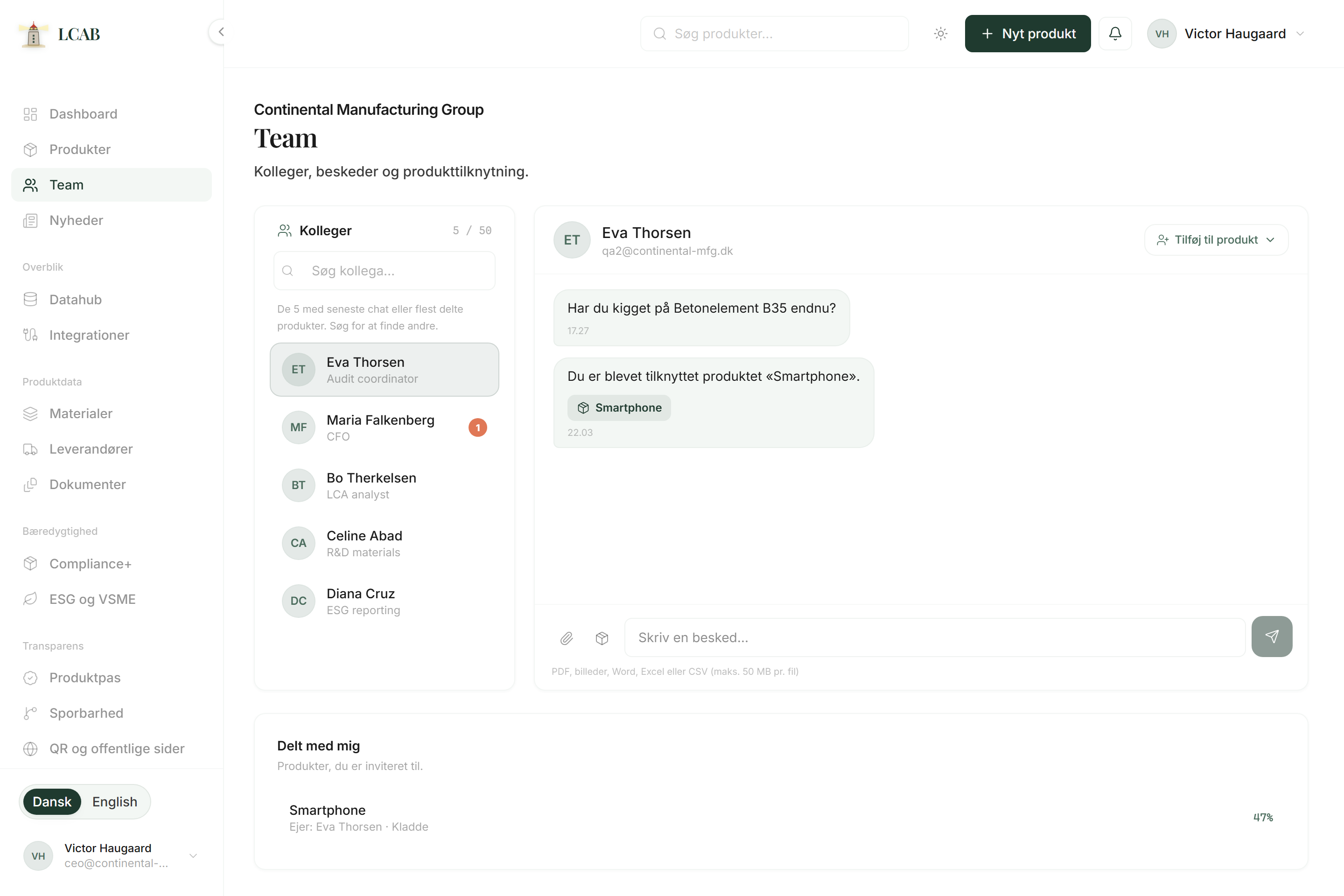
LCAB team page with colleagues and messages

Context

In most SMEs, product documentation sits beside the daily work: purchasing knows the suppliers, production knows the materials, sales knows the customer questions. Team and collaboration in LCAB make it possible to split the tasks without the data ending up in private folders.

You invite colleagues, give access to the products they should work on, and let each role fill their layer: materials, documents, wizard steps, or passport. The work stays visible even when it is not a full-time role for anyone.

That means fewer parallel spreadsheet versions and fewer emails asking where the latest file is. When contributions land on the same product page, the person answering the customer can see status without stitching threads by hand.

External consultants can join the same way: access to the products they should help with, so their work becomes part of your structure, not a separate delivery you have to retype afterwards.

Context

Why it matters for a small product team

When only one person knows the spreadsheet, the company is fragile. Collaboration around the product means you can answer the customer even when that person is busy. It also means less duplicate work: purchasing updates the supplier once, and everyone else sees it.

For founders and small teams, splitting five tasks is often more realistic than hiring an environmental team. LCAB is built for that reality.

When roles are clear, gaps become clear too. If documents are missing, you know whether purchasing, production, or an external helper should respond. The work does not lose ownership just because it is split.

Team is also a transition path: you can start alone, invite the first colleague when the load grows, and later give a consultant temporary access without switching tools.

Split five tasks. Do not hire an environmental team just to get started.

In depth

What you find here

Each part has a clear purpose. Here is what it does, when it makes sense, and how teams typically use it.

01

Team invite

Invite colleagues into the organisation so sustainability work does not sit on a single private account. Everyone works in the same product structure, and knowledge follows the product instead of personal folders.

Use it when more people need to contribute, or when you want to avoid knowledge living with only one person.

How to use it

  1. Open Team and send the invite.
  2. Confirm the colleague has access to the organisation.
  3. Point them to the products they should start with.

02

Product sharing

Share specific products with the people who should fill materials, documents, or wizard steps. That keeps ownership clear without everyone needing to see the whole portfolio, and it makes temporary help safer.

Use it when roles are split, or when an external helper should only see selected products.

How to use it

  1. Open the product and share it with the right person.
  2. Agree what they should fill (for example supplier data or documents).
  3. Check the product page afterwards for status and gaps.

03

Split roles in practice

Let purchasing own suppliers, production own materials, and the person who answers customers own the overview. LCAB is where the contributions meet, not yet another parallel folder. When each role has a layer, gaps become visible too.

Use it when you want documentation to become a shared habit, not a one-off project.

How to use it

  1. Write down briefly who owns which layers.
  2. Let each role fill their layer in LCAB.
  3. Use the dashboard and product page to see what is still missing.

Outcome

What you get

  • Invite via Team

    Bring colleagues into the organisation so the work does not sit on a private account or a personal sheet.

  • Focused product sharing

    Share specific products with the people who should contribute. Not everyone needs to see the whole portfolio.

  • Shared workspace

    Materials, documents, wizard, and passport meet on the same product page, so contributions do not disappear in email.

  • Split roles without chaos

    Let purchasing, production, and sales own each layer, while the overview stays visible for the person answering the customer.

  • Room for externals

    Consultants and temporary helpers can get access to selected products without creating a parallel folder.

Together

What you do not need to be an expert in

You do not need a sustainability department to collaborate here. You need to point to who knows the bill of materials, who talks to the supplier, and who answers the customer.

LCAB keeps the contributions together so you do not lose the thread between roles. Deeper method comes when you are ready for wizard, report, or passport. Collaboration starts with the split.

Start

Typical start in LCAB

  1. Invite colleagues

    Send an invite via Team, or start with product sharing for the first person who should contribute.

  2. Give access

    Point them to the products they should work on, not necessarily the whole portfolio.

  3. Agree ownership

    Write briefly who owns materials, documents, and wizard steps, so tasks do not fall between roles.

  4. Follow status

    Let each role fill their layer, and use the product page to see what is still missing.

Answers

Short answers

01

Does everyone need the same access?

No. Share the products each person should work on. That keeps focus on what matters without everyone seeing everything.

02

Can external consultants be included?

Yes, typically by giving access to the products they should help with, so their contribution lands in the same structure as yours.

03

What if we are only one or two people?

Then Team is still useful the day you grow, or when an external helper joins temporarily. Until then you use the same product pages alone.

04

How do we avoid everyone editing the same thing?

Agree ownership per layer: materials, documents, wizard. The product page shows status, so you can see what is missing without overwriting each other blindly.

Next step

Want to see it on your own products?

Book a walkthrough. We look at your bill of materials and files and show how they land in LCAB.

No commitment. You can start with the demo if you want to see the system first.

No commitment

01

Book a walkthrough

Please contact me by