Skip to content

Product

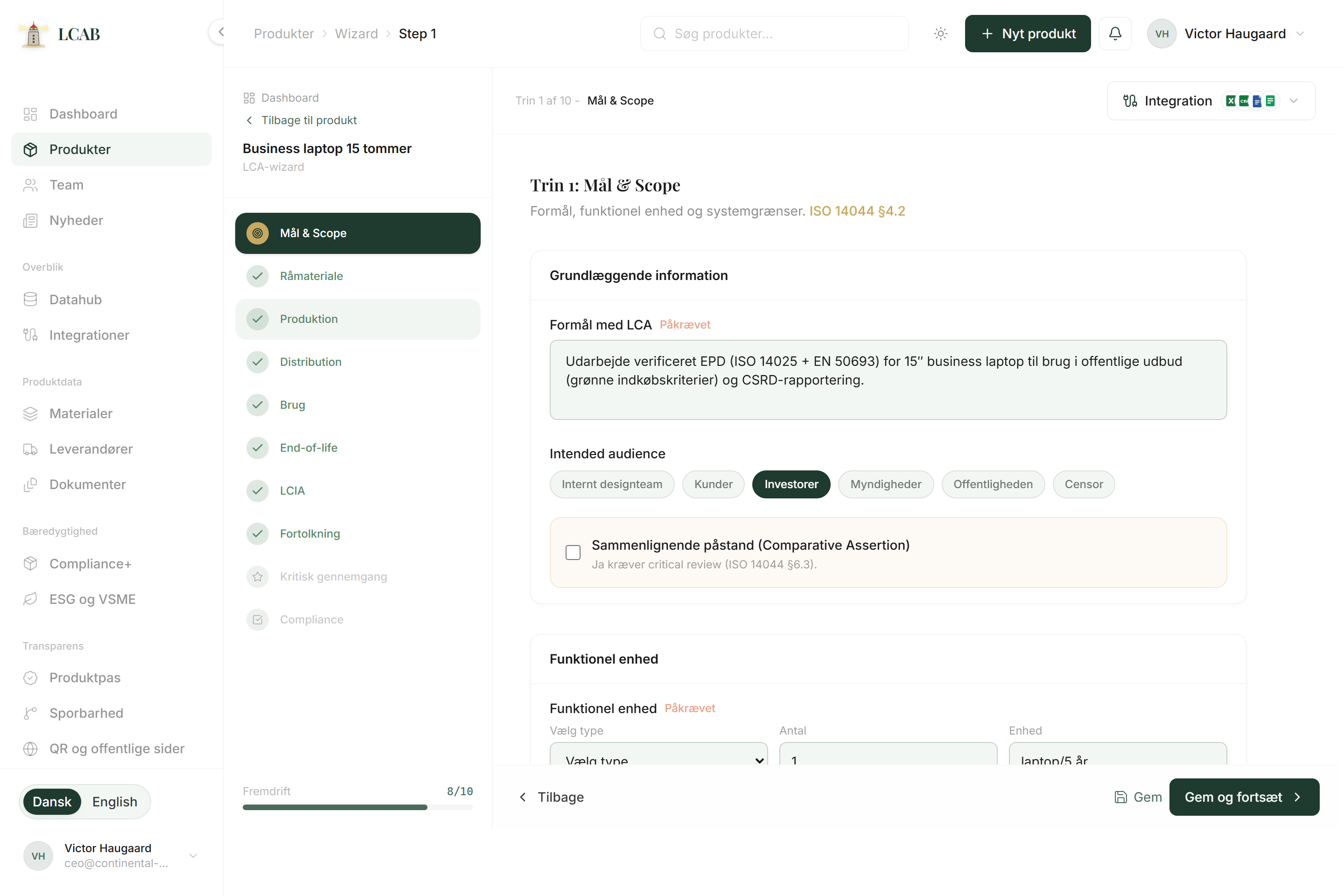
LCA wizard

Guided work with life cycle assessment, climate, and clarity about what is missing, without starting in the full standard text.

LCAB LCA wizard with goal, scope and ambition level

Context

A life cycle assessment (LCA) looks at the environmental impact of the product through materials, production, use, and end of life. In LCAB the wizard is the guided flow that follows the logic of ISO 14040 and ISO 14044: goal and scope, inventory, impact assessment, and interpretation.

The goal is not to turn you into consultants on day one. The goal is to get your own data into an understandable sequence, mark gaps, and end with a draft you can show internally or send on for review.

Carbon footprint after ISO 14067 can be a shorter track when the focus is climate. The wizard and reports help you keep scope and data clear, so you do not mix a quick climate figure with a full LCA without saying so.

Context

Why it matters for a small product team

Customers and tenders ask more often for climate footprint and environmental documentation. Without a structure, the answer becomes either a guess or an expensive external process you cannot follow. The wizard gives you a shared language about what is included, what is missing, and what the next step is.

For a small team, visible gaps matter more than a perfect result the first time. When gaps are marked, you can ask the supplier for the right thing instead of collecting random PDFs with no connection.

A draft with your own numbers often starts the internal conversation: what you can promise, what must be gathered, and when verification makes sense.

Visible gaps matter more than a perfect result the first time.

In depth

What you find here

Each part has a clear purpose. Here is what it does, when it makes sense, and how teams typically use it.

01

Guided LCA wizard

A step-by-step wizard that follows the logic of ISO 14040 and ISO 14044: goal and scope, inventory, impact assessment, and interpretation. After Excel extract, sections that still need completion are marked, so you do not think the work is done when it is not.

Use it when you need to run or update a life cycle assessment without starting in the full standard text.

How to use it

  1. Open the product and start the wizard from step 1, or fill fields via Integration on New product.
  2. Fill the fields you can. LCAB shows and marks what is missing before you move on.
  3. Review the results and use the interpretation to decide the next improvement or report.

02

Reports and export

Generates reports in several formats: full ISO 14044-oriented documentation, EPD-oriented documentation, carbon footprint after ISO 14067, and ILCD+EPD XML for import into tools that read the format (e.g. LCAbyg, SimaPro or OpenLCA among others). Each PDF issuance gets a document ID.

Use it when results need to be shared with customers, buyers, leadership, or for an internal decision.

How to use it

  1. Make sure the wizard and core data are sufficiently filled.
  2. Choose report type under Reports or on the product. ILCD+EPD XML downloads under Export.
  3. Issue the document and share the document ID so the recipient can verify it.

03

Compliance overview

Score and checklists that show progress toward ISO-related points, EPD/CFP readiness, and passport readiness. It does not promise certification. It makes gaps visible in time so you can prioritize before a customer or auditor asks.

Use it to prioritize next steps before a customer or auditor asks.

How to use it

  1. Open Compliance or see the score on the dashboard and product page.
  2. Identify the fields or documents pulling the score down.
  3. Fix the gaps in the wizard, materials, or document center, then check the score again.

Outcome

What you get

  • Guided wizard

    Goal, scope, inventory, impact, and interpretation in a sequence that follows ISO logic without starting in the full standard text.

  • Marked gaps

    Sections still missing after Excel extract or manual steps become visible, so you do not think the work is done too early.

  • Reports and export

    ISO-oriented draft, EPD-oriented documentation, carbon footprint (ISO 14067), and ILCD+EPD XML with document ID.

  • Compliance overview

    Score and checklists that make gaps visible. It does not promise certification. It helps you prioritize.

Guided

What you do not need to be an expert in

You do not need to know ReCiPe, LCIA methods, or the full ISO text by heart. You need to describe the product, what it is used for, which materials you know, and where the data is uncertain.

LCAB guides the sequence and shows the gaps. A verified EPD or approved third-party report is a later step, not the starting requirement.

Start

Typical start in LCAB

  1. Gather core data

    Make sure product, materials, and suppliers are in place, or import them first.

  2. Start the wizard

    Open the product and go from step 1, or fill fields via Integration.

  3. Fill and mark

    Fill what you can. Do not stop at the gaps: mark them, or let the import mark them.

  4. Make a draft

    When core data is in place, generate a draft or carbon footprint, and decide the next step.

Answers

Short answers

01

Is an LCAB draft the same as a verified EPD?

No. The draft is a documentation basis with your data. Verification and approval happen with an independent party when you are ready.

02

Can we do a carbon footprint without a full LCA?

Yes. Carbon footprint after ISO 14067 focuses on climate. The wizard and reports help you keep scope and data clear.

03

What if we are missing supplier data?

Continue with what you have and leave the gaps visible. Then you know exactly what to ask the supplier for.

Next step

Want to see it on your own products?

Book a walkthrough. We look at your bill of materials and files and show how they land in LCAB.

No commitment. You can start with the demo if you want to see the system first.

No commitment

01

Book a walkthrough

Please contact me by